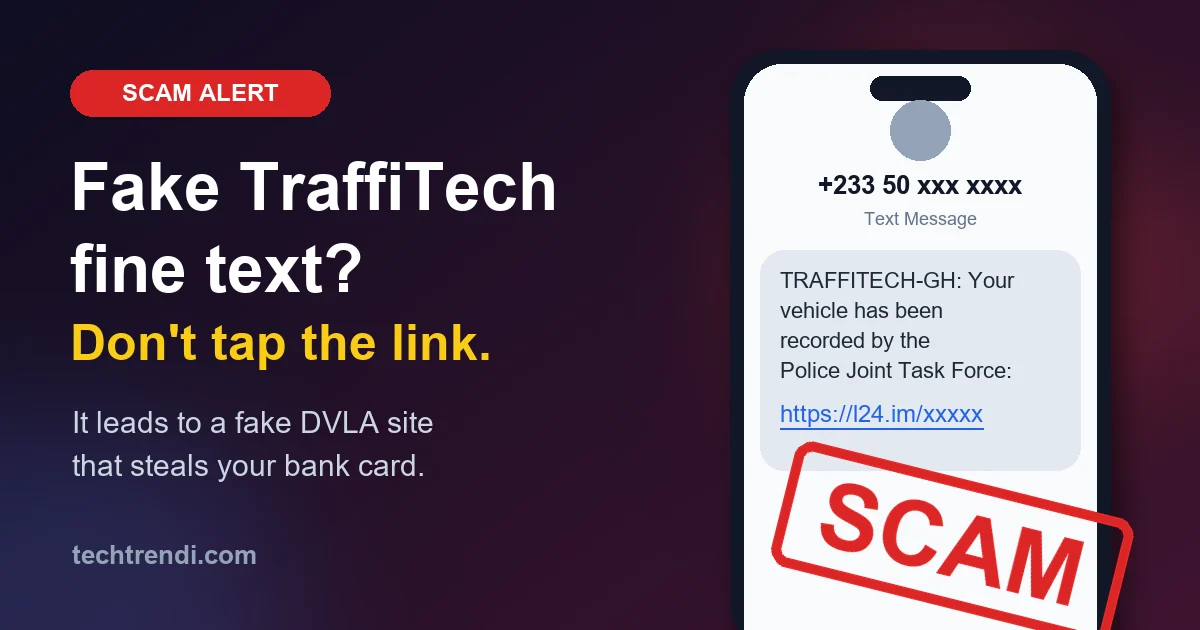
The text looks official. It starts with "TRAFFITECH-GH", says your vehicle "has been recorded by the Intelligent Transportation Systems-Police Joint Task Force", and gives you a link to check.
You tap it. A green-and-white page with the DVLA logo asks for your number plate. You type it in, and it tells you your car was caught doing 57 km/h in a 50 zone. The fine is only GH₵84.69. To pay, just enter your bank card details.
Every part of that is fake. The message, the website, the speeding offence and the fine. The only real thing is the card number you type in, and that goes straight to criminals.
We went through this scam step by step, using screenshots shared by the security researchers at Dead Pixel Forensics (@deadpixel_forensics on TikTok), who traced where the link really goes. Here's what they found, and how you can protect yourself and your family.
Why This Scam Is Working Right Now
The Ghana Police switched on TraffiTech-GH, the new speed camera system, on 1 November 2026. Fines now arrive by text message, with no officer and no roadside stop. (If you haven't read it yet, our TraffiTech-GH guide explains how the real system works.)
That's a gift for scammers. Millions of drivers now expect a text about a fine. Most have never seen a real one, so they don't know what it should look like.
And the crooks were ready early. The link in the message we looked at was first checked by a security scanner on 13 October 2026, more than two weeks before the cameras even went live. On 9 October, a tech business owner in Ghana told 3News he got a similar text leading to a fake DVLA site. By 21 October, DVLA itself had put out a warning. And on 2 November, just one day after launch, more fake fine texts were hitting phones.
How the Scam Works, Step by Step
Step 1: The text message
The text we looked at came from +233 50 576 6847, an ordinary mobile number. It said:
TRAFFITECH-GH: Your vehicle has been recorded by the Intelligent Transportation Systems-Police Joint Task Force: https://l24[.]im/RPQqS9
(We've broken the link on purpose with [.] so nobody taps it by mistake.)
Notice what's missing. There's no ticket number, no car number, no place, no date, and no amount. A real fine has all of those. This message tells you nothing, so you're forced to tap the link to find out more. That's the whole trick.
Other versions are going round too. One reported by 3News said "Official Traffic Message: Your vehicle has a recorded traffic violation. Check the relevant information through the official portal", again from a normal mobile number, again with a short link.
Step 2: The link hides where it really goes
l24[.]im is a link shortener, a service that turns a long web address into a short one. Scammers use them because you can't see the real destination until it's too late.
When Dead Pixel Forensics ran the link through a security scanner, it showed the real address behind it: desla-gsov[.]sbs.
Look at it closely:
- "desla" looks a bit like "dvla" if you glance at it quickly
- "gsov" is there to look like "gov"
- ".sbs" is a cheap web ending anyone can buy for a few cedis
The real DVLA website is dvla.gov.gh. Real Ghana government websites end in .gov.gh. Nobody but the government can get one of those.
Step 3: A scary "Attention" page
The fake site copies the DVLA logo and name at the top. It says "Vehicle Services" and shows a warning:
Please pay this fine as soon as possible. Non-payment may result in additional sanctions, suspension of your driving license, or legal action.
Fear is the point. When you're worried about losing your licence, you stop thinking carefully. Then it asks you to type your number plate.
Step 4: A made-up offence
After you type a plate, the site shows a page called "Traffic violation recorded" with a big green tick-style box saying "Driver licence number verified". It lists:
- Recorded speed: 57 km/h
- Speed limit: 50 km/h
- "Demerit points on licence: 0"
It's cleverly chosen. Just 7 km/h over the town limit is something almost every driver has done, so you think "yes, maybe that was me." And the site isn't linked to any police or DVLA records. It isn't checking your plate against anything. It's just showing you a page designed to look like proof.
Step 5: The "secure payment" page
Finally, the trap. A page titled "Secure payment" promises "Your personal data is protected and is not shared with third parties", then shows:
- A reference number like GH-TFC-GEVJS05
- An amount: GH₵84.69
- Boxes for your name, card number, expiry date and CVV (the 3 numbers on the back of your card)
Why such a small amount? Because you won't argue about GH₵84. You'll just pay it to make the problem go away. But the criminals don't want your GH₵84. They want your card details. With the number, expiry date and CVV, they can try to spend far more than that, on your card, without you.
In other versions reported in Ghana, the fake site asked for GH₵120, or "only GH₵60 if you pay within 48 hours." That fake discount is a trick to make you hurry. DVLA has said clearly: "The DVLA does not offer discounts on fines."
Step 6: A real phone number to make it look real
Here's the sneakiest part. At the bottom of the fake site there's a footer with "Headquarters: Cantonments, Accra" and a call centre number, 030 276 2449.
That number is the real DVLA call centre number, copied from the real DVLA website. So if you call it to check, you reach real DVLA staff. The scammers are counting on you seeing a real number and thinking the whole site must be real. A real phone number on a website doesn't prove the website is real. Anyone can copy a phone number.
Real Fine vs Fake Fine: Spot the Difference
| What to check | ✅ Real TraffiTech-GH fine | ❌ Fake fine |
|---|---|---|
| Who sent it | The name GPS-MTTD | A normal phone number like +233 50… |
| Link in the text | No link | Has a link, often a short one |
| Details | Ticket number, your car number, place, date, time, amount, deadline | Vague: "your vehicle has been recorded" |
| Website | Ends in .gov.gh or is the official TraffiTech-GH portal | Strange endings like .sbs, .top, .xyz, .online |
| Time to pay | 14 days | "Pay now", "within 48 hours" |
| Discounts | Never | "Half price if you pay today" |
| Video evidence | You can watch the video of your car | No video, just a page of numbers |
How to Check a Fine Safely
Got a text and you're not sure? Don't tap anything in the message. Check it yourself, using a route you chose:
- Dial *220# and enter your car number or licence number to see if you really have an unpaid fine
- Type the address yourself into your browser: traffitech-ghpay.nib.com.gh, then enter the Ticket Number from a real GPS-MTTD message to see the video evidence
- Call the TraffiTech-GH Call Centre on 059 692 2402
To pay a real fine, the Police list only these channels:
- ghana.gov.gh (the government's payment platform)
- The official TraffiTech-GH portal, traffitech-ghpay.nib.com.gh
- Dialling *710*0#
And the Police are clear: never send money to a personal number or a private account to pay a fine.
Already Typed Your Card Details? Do This Now
- Call your bank immediately. Use the number on the back of your card or in your banking app, not one from a website. Tell them your card details were stolen and ask them to block the card and send you a new one. Many banking apps also have a "freeze card" button you can press right away.
- Never share an OTP. Scammers often call next, pretending to be your bank or DVLA, and ask for "the code we just sent you". That code (OTP) is the key to your money. No real bank or government office will ever ask for it.
- Check your statement for payments you didn't make, and report each one to your bank. Ask about getting the money back (a "dispute" or "chargeback").
- Used the same details anywhere else? If you also typed a password or MoMo PIN on the fake site, change it now.
- Report it (see below). It helps get the fake sites taken down faster.
Where to Report a Fake Fine Text
- Cyber Security Authority (CSA): call or text 292 (free, 24 hours), WhatsApp 050 160 3111, or email [email protected]
- Ghana Police: 191 or 18555 (free)
- TraffiTech-GH Call Centre: 059 692 2402 or [email protected]
When you report, include a screenshot of the text, the sender's number, and the link (but don't tap it).
For the Tech-Curious: What the Scan Showed
If you like the technical side, here's what the security scan of the link revealed, and what it tells us about how these scams are run:
- Redirect chain: l24[.]im/RPQqS9 → desla-gsov[.]sbs/gh. The short link is a disguise. If one fake site gets blocked, the scammers just point the same short link somewhere new.
- Serving IP 104.21.93.41: this belongs to Cloudflare, a big company that sits in front of millions of websites. It hides where the scam site is really hosted, which makes it harder to trace and take down.
- Status 404, 9 bytes: when the scanner visited, it got an empty "not found" page. That can mean the site was already taken down. But scam sites also often hide from scanners on purpose, and only show the fake page to real phones in Ghana. So "the scanner found nothing" does not mean a link is safe.
- The /gh at the end suggests the same setup may be used with other country codes. Fake traffic fine and road toll texts are a worldwide scam, hitting drivers in many countries, and the crooks simply reuse their kit for each new country.
Want to check a suspicious link yourself without opening it? Paste it into a free scanner like VirusTotal (virustotal.com). Never tap it on your phone first. Our guide to 7 phishing red flags covers more warning signs.
The TechTrendi Summary
- Real fines: from GPS-MTTD, with a ticket number, and never a link
- Fake fines: from a normal phone number, with a link to a fake DVLA site
- The fake site wants: your card number, expiry date and CVV
- Real DVLA site: dvla.gov.gh. Real government sites end in .gov.gh
- Check fines: dial *220#
- Pay real fines only via: ghana.gov.gh, traffitech-ghpay.nib.com.gh or *710*0#
- No discounts. No "pay in 48 hours." No paying to a person
- Got caught? Call your bank now and block the card
- Report: CSA 292, Police 191 / 18555
What to Do Next
- Share this with your family WhatsApp group, especially older relatives who drive or own a car. They're the ones scammers target most
- Dial *220# today, so you know for sure whether you have a real fine
- Read our full TraffiTech-GH guide to know how real fines work, then catch up on the latest scams in Ghana and the most common MoMo scams
Thanks to Dead Pixel Forensics (@deadpixel_forensics on TikTok) for tracing this scam link and sharing the screenshots.
Sources
- 3News: Fake TraffiTech-GH fine texts hit phones a day after launch
- Ghana Police Service: TraffiTech-GH official page and FAQs
- News Ghana: Fake fine texts resurface as DVLA flags discount scam
- DVLA Ghana: official website and contacts
- Graphic Online: Fined by TraffiTech-GH? Here's how to pay or challenge it
- Adom Online: CSA asks public to report cybercrime on 292
Scammers change their messages and websites all the time. If a fine text has a link, or doesn't come from GPS-MTTD, treat it as fake and check through *220# or the official channels above.